3D Maze Escape - Play Free
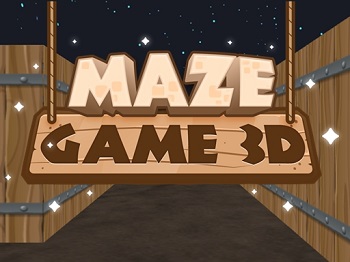
Here's a cool 3D mazes game called Maze Game 3D. On a computer, use the AWSD keys to move. There are 15 3D mazes to solve!
This game is part of the free online brain games collection.
To begin, click the Small, Medium, or Large button under the picture of the game. This opens the game in a new window.
If you like this game, you might also enjoy the other puzzler games on this site, such as Cargo Bridge.
Instructions - 3D Escape Game
Note: The instructions below are for the old Adobe Flash version of the game.
This free online brain game trains concentration, reaction time, and spatial awareness.
This maze escape flash game is a replacement for the Falstad 3D Mazes game. That game was built as a Java applet, a format now less-supported on the web.
HOW TO PLAY. Wait for the game to load, then click the PLAY button on the game to get started. Then you'll find yourself in one corner of a three-dimensional maze.
Search the maze and find the exit. Destroy any monsters you encounter.
The concept of this game is simple. You're stuck in this 3D underground dungeon, it's haunted, and you want to get out.
The problem is that you're in a maze with no map. So you need to explore the maze to find the Exit.
Use the Arrow keys to move. For example, to move forward, press the Up Arrow key. Press the Right Arrow key to turn right, and so on.
The maze is well-lit (or perhaps you're holding a torch), so you don't need to worry about being able to see. The farthest ends of hallways are dark, but it's bright enough near you.
Besides finding your way out of the maze, your other problem is the monsters. They're going to come after you.
The monsters in this maze escape game are giant, bouncing jack-o-lantern pumpkin heads. They sound scary, but they're really not.
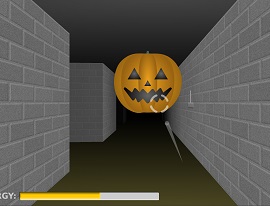
Monster in 3D Haunted Maze
However, these monsters either have really good hearing or a keen sense of smell. Because they are everywhere, and you cannot hide from them.
Instead, you need to shoot them. Fortunately, only a single shot is needed to shatter one of these guys.
To shoot, press the Spacebar or click the left button on your mouse.
Use the round reticle on the screen to aim. Use your mouse to move the reticle around to target a monster.
The gun reloads a bit slowly. Aim carefully before you fire.
You do have unlimited ammunition, which is a plus.
3D Haunted Maze Escape - Some Tips
To help you avoid becoming disoriented, there's a compass in the lower right of the 3D Maze Escape game. The red needle points North, presumably.
Each time you play this game, the maze pattern is different. The maze number displays in the lower right of the home screen.
That's a feature I really like, because it means you'll never be able to simply memorize the maze for future play-throughs.
Instead, you'll have to discover the Exit each time.
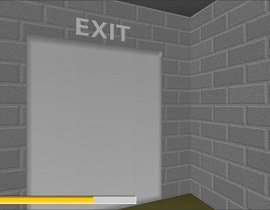
The Exit! Escape Through This Door
Here are a couple more tips. First, the exit door has a nice big Exit sign above it. So you'll know it when you find it.
To exit the maze, simply walk into the door.
Also, you have a limited amount of health. The Energy bar in the lower left of the game displays how much health you have remaining.
Each time a pumpkin monster touches you, your health decreases. I think you also lose health slowly over time, just from running around.
If your energy bar drops to zero, you lose. So don't let the monsters get too close, and don't waste too much time. There isn't any way to heal yourself.
Since the monsters are adept at finding you, I've found it's not helpful to stay in one place very long. Otherwise, a monster is likely to sneak up behind you.
Instead, run forward a bit, look around and shoot monsters, then keep running. You'll get through the 3D maze faster that way, too.
Be careful going around corners. Sometimes the monsters hide around a corner.
Maze games like this one are great brain games. They can help strengthen important brain skills like spatial orientation, concentration, and reaction time.
Play a variety of brain games often to help your brain stay sharp!
Published: 12/06/2008
Last Updated: 07/07/2022
New / Popular
Multiplayer
Board Games
Card & Tile
Concentration
Math / Memory
Puzzles A-M
Puzzles N-Z
Time Mgmt
Word Games
- Retro Flash -
No sign-up or log-in needed. Just go to a game page and start playing! 
100 Free Puzzle Printables:
Sudoku / Word Search